Reviewed · SEOUL TOURS
South Korea eSIM (3-30 days. Up to 45GB)
South Korea’s fast, reliable mobile service is a big help when you are finding a Seoul address, checking train times, translating a menu, or calling home. This digital eSIM arrives by email, so you can set it up before you leave instead of hunting for a SIM counter at the airport. Choose from 3 to 30 days and data packages up to 45GB.
I like two things in particular: the simple QR-code setup and the chance to avoid airport prices, plastic SIM cards, and a language barrier. I also like that the plan is intended for the whole trip, with 4G or 5G where available and unlimited 3G data after the high-speed allowance is used. The main catch is compatibility: your phone must support eSIM, and activation may require turning on data roaming and restarting the device.
Key points to know before you buy
- Email delivery before departure: You receive the eSIM and QR code digitally, with no pickup point or meeting time.
- Plans from 3 to 30 days: Match the validity period to the length of your stay.
- Up to 45GB of high-speed data: After the stated allowance, service continues at 3G speed.
- 4G and 5G where available: The connection is intended for maps, messaging, calls, browsing, and general trip planning.
- Useful setup tip: Turn on data roaming after landing, then restart your phone if the eSIM does not fully activate.
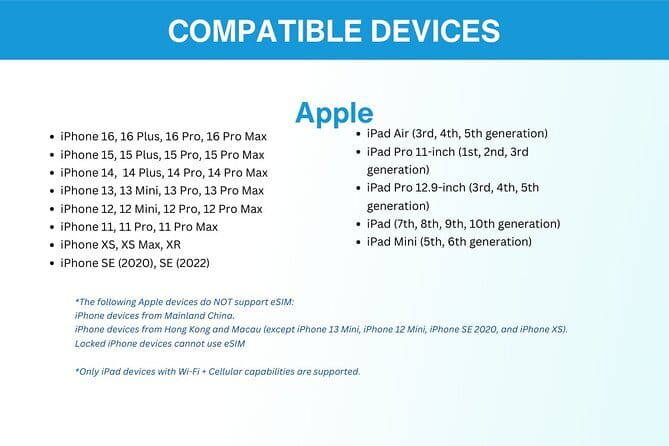
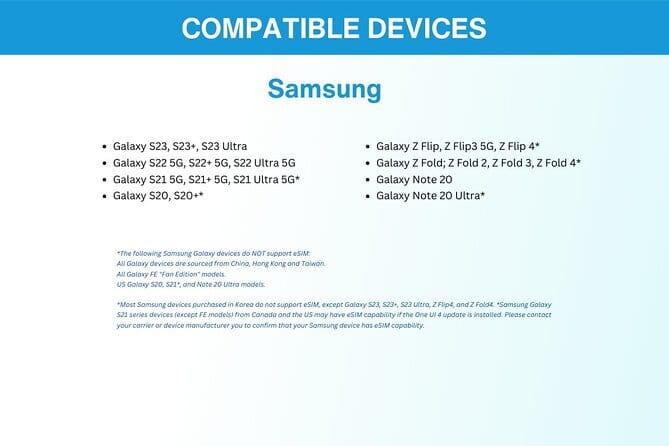
- Check your device first: Supported examples include iPhone XS and newer, Pixel 3 and newer, and Samsung S20, S21, and Fold models.
What this South Korea eSIM actually provides
This is not a guided activity with a route, sightseeing stops, or a local host. It is a mobile data product for use during your stay in Seoul and elsewhere in South Korea. The listed start and end point is Seoul, but there is no physical meetup because everything is delivered online.
That distinction matters. You are paying for connectivity, not for an organized tour. Once the eSIM is active, you use your phone as you normally would for internet-based services. You can look up directions, message friends, check opening hours, use translation tools, and make internet calls without relying on hotel Wi-Fi.
The plan uses local mobile networks and provides 4G or 5G service where available. The exact speed will depend on the selected package, network conditions, phone, and location. In normal use, the data is suited to practical travel needs. Maps, messages, email, browsing, ride information, and light social media use should be the main demands on your allowance.
Some plans include as much as 45GB of high-speed data. That is a generous amount for most short trips, especially if you use Wi-Fi at your accommodation. If you spend your days watching high-definition video or using your phone as a personal hotspot, you will use data much faster. Once the high-speed allowance is gone, the connection changes to 3G speed rather than stopping completely.
A few more Seoul half-days to weigh up
- Best DMZ Tour Korea from Seoul (Red Suspension Bridge Optional)
★ 5.0 · 41,422 reviews - DMZ Tour: 3rd Tunnel, Option(Suspension Bridge, Boat) from Seoul
★ 5.0 · 21,373 reviews - DMZ tour south Korea from Seoul (NK experience hall, defector)
★ 5.0 · 20,599 reviews
Setting it up before you fly to Seoul
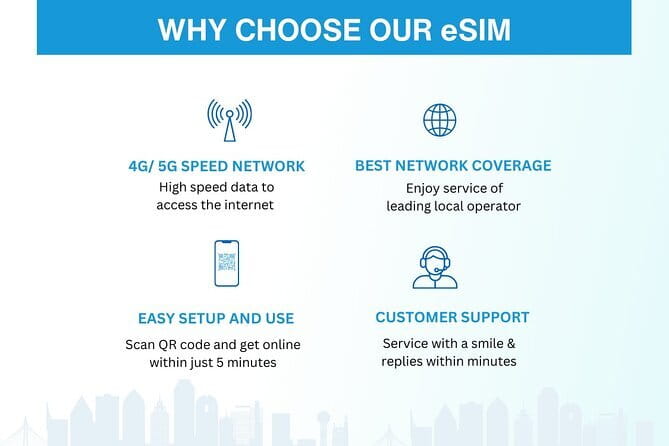
You receive the eSIM by email after booking. The important step is to install it while you still have a reliable internet connection, ideally before leaving home. You scan the QR code to add the eSIM profile to your phone, then follow the device prompts.
The exact screens differ between Apple, Google, and Samsung phones. The basic process is similar: add the eSIM, label it so you can recognize it, and keep your regular home SIM available for calls or text messages if your phone supports both lines.
Do not delete your home SIM unless you are certain you will not need it. An eSIM does not require removing a physical card, which is one of its most useful features. You can keep your normal number in place while using the South Korea plan for data.
Before you activate anything, check the phone’s settings and confirm that the eSIM has been installed correctly. You should also make sure your phone is unlocked for use with other networks. The supplied information specifically asks you to confirm eSIM support, so contact the provider before purchase if you are unsure.
Supported examples include the iPhone XS and later, Google Pixel 3 and later, and Samsung S20, S21, and Fold models. These examples are helpful, but they are not a complete list. A newer phone is not automatically compatible, so check the model and settings rather than relying on its age.
Landing in South Korea and getting online
After you land, select the new eSIM as the line for mobile data. You may need to turn on data roaming for the eSIM to connect. This sounds slightly alarming, but it is part of how many international data plans work. Be careful to keep data roaming switched off on your home line if your regular carrier charges international fees.
A useful practical tip is to restart the phone after turning on the eSIM and data roaming. One reported setup experience found that a restart was needed for full activation. If the phone does not connect right away, restarting is a sensible first step before trying more complicated settings.
The QR code activation is designed to take only a few minutes, but your result depends on the phone and the setup conditions. Give yourself time to install it before your flight rather than waiting until you are standing in the arrivals hall with low battery and no Wi-Fi.
Once connected, test a webpage or map. This confirms that the correct line is handling data and that your home SIM is not accidentally using an expensive roaming plan.
Using your data around Seoul and beyond
The strongest reason to buy this plan is convenience. Seoul can be easy to navigate once you have a map and a working connection, but it is far less comfortable when you are trying to find a hotel address or decode a transit instruction with no data.
I would use the eSIM for directions, messaging, translation, restaurant research, and booking confirmations. It should also help you keep in touch with family and friends without looking for a café or hotel network every time you need to send a message.
The plan is not limited to a single Seoul neighborhood. The supplied information describes use throughout South Korea, and one account found automatic connection to a strong local network from Seoul to Jeju Island. That makes it useful if your trip includes more than the capital. Still, mobile performance can vary by location, building, network load, and device, so do not treat a promised 5G icon as guaranteed everywhere.
You can also use the data for video calls and streaming, according to the supplied experience. That is a welcome benefit if you need to speak with family or want entertainment during a long wait. I would still save heavy streaming for Wi-Fi when possible, since video can consume a large part of a 45GB allowance.
The plan is especially practical for a phone-dependent visit. You may need mobile access for directions, translation, messages, and last-minute changes several times a day. Having the connection ready removes a small but constant source of stress.
A different way to spend a day from here:
- Seoul: DMZ Tour with Optional Suspension Bridge
★ 4.8 · 5,277 reviews - Seoul: DMZ The 3rd Tunnel and Suspension Bridge Tour
★ 5.0 · 4,656 reviews - Signature DMZ Tour: Exclusive Defector Talk & Suspension Bridge
★ 5.0 · 4,459 reviews - Incheon Airport: Traveler SIM & T-money Transportation Card
★ 4.7 · 3,332 reviews
How the 3G fallback changes the value
The high-speed limit deserves careful attention. Your chosen package includes a stated amount of 4G or 5G data, up to 45GB depending on the option. Once that allowance is used, the service continues with unlimited 3G data.
This is better than a hard cutoff. You can still send messages, check simple web pages, and use basic directions after reaching the limit. The tradeoff is speed. Video calls, streaming, large photo uploads, and image-heavy websites may become frustrating at 3G rates.
For a three-day visit, you may not need the largest package unless you plan to stream often. A longer stay, frequent video calls, or extensive map and media use makes a larger allowance more sensible. The right choice depends less on the number of days alone and more on how much of your day will be spent online.
If you usually connect to Wi-Fi at your hotel and restaurants, the smaller option may offer good value. If you want to use your phone freely without thinking about every megabyte, choose a larger plan. The price starts at $5 per person, but the exact cost depends on your selected duration and data allowance.
Is the $5 starting price good value?

At a starting price of $5, this is inexpensive insurance for a trip to South Korea. The value is not only in the data. You also avoid a visit to an airport counter, the need to handle a tiny physical SIM card, and the possibility of explaining your requirements while tired after a flight.
Airport SIM purchases can be convenient, but they may cost more and take time. With this eSIM, the product is in your inbox before departure. You can arrive with the setup mostly complete and start using data once the phone connects.
The price is less impressive if your phone cannot use eSIM or if you already have an excellent international plan from your home carrier. Check those points before buying. There is no reason to pay for a second data service if your existing plan already covers South Korea at a similar cost.
The plan also does not appear to include a local South Korean phone number or voice minutes. The information provided describes mobile data access. You can still use internet-based messaging and calling services, but do not buy this expecting a traditional local SIM package with regular calling credit.
One detail needs clarification before purchase: the description also says the data plan covers all Canadian provinces. That does not match the South Korea product described here. I would contact Xplori and confirm the intended coverage, package, and network before paying, especially if your itinerary includes South Korea only.
What happens if the connection is not immediate?
Remote customer service is included by email. There is no physical support desk, pickup location, or in-person meeting point, so you need access to email if you run into trouble.
The practical setup order is simple:
- Confirm eSIM support and phone unlocking before booking.
- Install the profile using the emailed QR code.
- Choose the eSIM for mobile data after landing.
- Turn on data roaming for that eSIM.
- Restart the phone if it does not connect fully.
- Check a webpage or map before leaving the airport.
That checklist handles the most important issues described for this product. If the phone still does not connect, email support is the stated help channel. Since support is remote, I would not wait until you are already lost in Seoul to discover that the QR code is on a device you cannot access.
Who should choose this eSIM?
This option fits you best if you want a quick data setup and prefer to arrange essentials before departure. It is particularly useful for solo visitors, first-time visitors to South Korea, and anyone who depends on maps, translation, or messaging throughout the day.
It also suits a multi-stop itinerary. The available information and practical use described for Seoul and Jeju suggest that the plan is intended for wider use across South Korea, not just the capital. You should still confirm coverage for any specific remote areas on your route.
Families and groups may also like the low starting price, though each person needs a compatible device and a separate plan. The product is sold per person, so calculate the total cost if several phones need data.
I would be more cautious if you have an older phone, do not know how to add an eSIM, or need a traditional Korean phone number. The product is data-focused, and the setup is your responsibility. Remote email help is available, but there is no in-person installation.
Cancellation and booking details
You receive confirmation at the time of booking, and cancellation is free if completed at least 24 hours before the experience start time. A cancellation made less than 24 hours in advance is not refunded, and changes inside that window are not accepted.
There is no pickup or meetup. The activity begins and ends digitally, with the eSIM sent by email. Most people can use the service, but phone compatibility remains the key condition.
FAQ
How long can I use the South Korea eSIM?
You can choose a plan lasting from 3 to 30 days. Select a duration that matches your trip.
How much high-speed data is available?
The available plans offer up to 45GB of high-speed data. The exact amount depends on the package you select.
What happens after I use the high-speed allowance?
After you reach the stated high-speed data limit, the connection continues at unlimited 3G speed.
How do I receive the eSIM?
The eSIM is delivered by email after booking. You use the emailed QR code to install and activate the eSIM profile.
Do I need a compatible phone?
Yes. Your phone must support eSIM. Examples given include the iPhone XS and later, Pixel 3 and later, and Samsung S20, S21, and Fold models. Contact the provider if you are unsure.
Can I cancel for a full refund?
Yes, if you cancel at least 24 hours before the experience start time. Cancellations made less than 24 hours before the start time are not refunded.
Should you book this South Korea eSIM?
I would book it if you want affordable, ready-to-use mobile data and your phone supports eSIM. The biggest strengths are the emailed QR code, the choice of trip lengths, the high-speed allowance, and the unlimited 3G fallback. The automatic local network connection and reported use from Seoul to Jeju also make it practical for a wider South Korea itinerary.
Before you pay, confirm three things: your phone supports eSIM, your phone is unlocked, and Xplori confirms that the package covers South Korea as intended. If those checks are clear, this $5 starting option is a sensible way to keep maps, messages, and trip plans close at hand without stopping at an airport SIM counter.
Recently added around Seoul
- Seoul: Private Car Tour with Licensed Professional Guide★ 5.0 · 3 reviews
- Imjingak DMZ Private Tour for Incheon Airport and Cruise Guests★ 5.0 · 3 reviews
- Unique Native Experience : Han River Picnic, Board game, BBQ★ 5.0 · 3 reviews
- Seoul: Nami and K-Garden with Optional Alpaca Winter Tour★ 5.0 · 3 reviews
- BTS In The Soop Version: One Day Private VIP Tour★ 5.0 · 3 reviews
- DMZTour from Seoul:3rd Tunnel,North Korea View&UNESCO Valley★ 5.0 · 3 reviews
- Bukhansan mountain hiking tour – 6 hours★ 4.7 · 3 reviews
- Seoul’s Hidden Dark History Guided Tour of Seodaemun Prison★ 5.0 · 3 reviews
Seoul Tours, compared.
Best DMZ Tour Korea from Seoul (Red Suspension Bridge Optional)
Read the review →
DMZ Tour: 3rd Tunnel, Option(Suspension Bridge, Boat) from Seoul
Read the review →
DMZ tour south Korea from Seoul (NK experience hall, defector)
Read the review →

DMZ The 3rd Tunnel and Suspension Bridge Tour
Read the review →
Signature DMZ Tour: Exclusive Defector Talk & Suspension Bridge
Read the review →
Thrilling Korean DMZ 3rd Tunnel Tour from Seoul + Red Bridge Rush
Read the review →