Reviewed · SEOUL TOURS
Incheon Airport: Traveler SIM & T-money Transportation Card
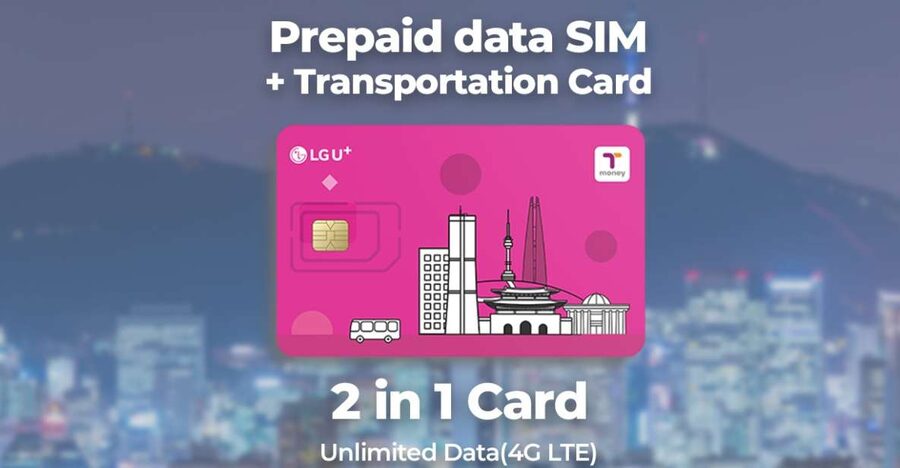
South Korea gets much easier when your phone works the moment you leave customs. This airport pickup combines unlimited 4G LTE data with a T-money transportation card, so you can find your hotel, translate a menu, message home, and board a subway without first hunting for a mobile shop.
I like the quick counter service and the fact that staff can insert the SIM and test the connection for you. I also like getting the T-money card at the same time, since it handles subways and buses across Korea. The main catch is that the card needs a separate cash top-up, and phones from some countries may not accept a physical SIM.
Key points to know
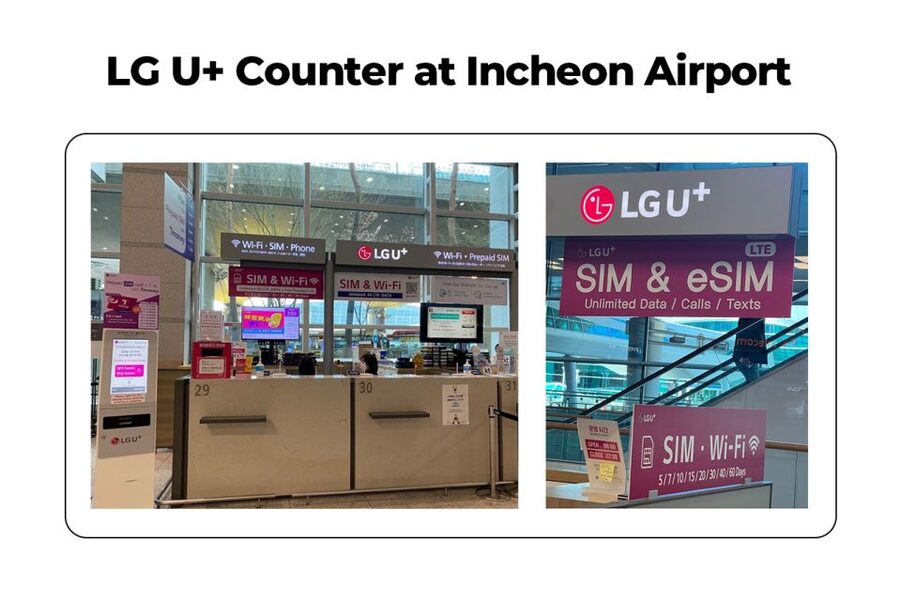
- Pick up at Incheon Airport: Use the LG U+ counter at Terminal 1 Gate A or Gate F, or Terminal 2 Gates 3 to 4 or 4 to 5.
- Staff activate the SIM: The greeter can fit the card, check your data connection, and explain the basic setup.
- Unlimited 4G LTE data: Use maps, email, messaging, social media, and online bookings during the selected period.
- T-money included: The card works for Korean subways and buses, plus certified taxis and some convenience-store purchases.
- Bring cash for top-ups: The transportation balance is separate from the SIM price and must be charged before use.
- Choose your trip length: Options run from 3 days to 2 months, with the exact choice available when you check availability.
Why online access matters from your first hour in Korea
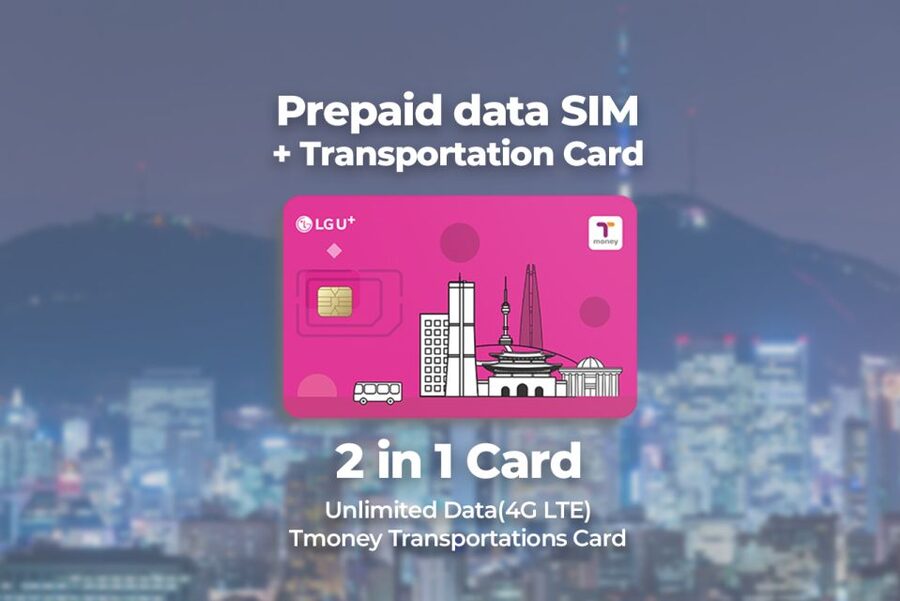
The value here is less about owning a plastic SIM card and more about removing small problems from your arrival. In Korea, you may need an online map to locate a hotel entrance, a translation tool to read signs, or a messaging app to contact your accommodation. Airport Wi-Fi can help briefly, but a working mobile connection follows you onto the train, down a side street, and into a cafe.
The included SIM provides unlimited 4G LTE data for the period you select. That means you can check routes, share photos, read work email, and search for restaurants without watching a small data allowance disappear.
The service also includes hotspot use. That is useful if you are carrying a second phone, tablet, or laptop and want to share the connection. Still, the product is mainly designed for straightforward personal use, not for heavy work by a whole group.
Incoming calls and text messages are included. Outgoing calls and text messages are not, so use internet messaging services for regular contact. If you need a Korean number for a particular identity-check process, note that identity verification service is excluded.
A few more Seoul half-days to weigh up
- Best DMZ Tour Korea from Seoul (Red Suspension Bridge Optional)
★ 5.0 · 41,422 reviews - DMZ Tour: 3rd Tunnel, Option(Suspension Bridge, Boat) from Seoul
★ 5.0 · 21,373 reviews - DMZ tour south Korea from Seoul (NK experience hall, defector)
★ 5.0 · 20,599 reviews
Finding the LG U+ counter at Incheon
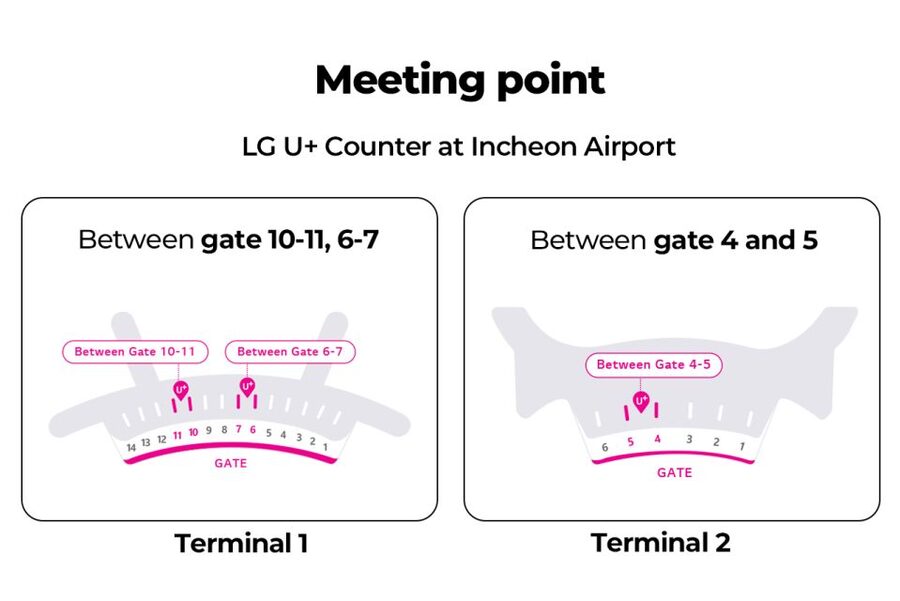
Your first task is reaching the correct counter after immigration, baggage collection, and customs. At Terminal 1, the recommended location is Gate A, with Gate F also available. At Terminal 2, the stated locations are Gates 3 to 4 and Gates 4 to 5.
Gate A is recommended as the less busy Terminal 1 option. It is also described as easy to spot after customs, with signs for eSIMs and roaming cards. Give yourself a few extra minutes if you have just arrived at a different part of the terminal, since one pickup point may involve a walk through the arrivals hall.
At some counters, you need to take a queue ticket from a machine before waiting. This is easy to miss if you simply walk up to the desk. The line usually moves quickly, but take a number as soon as you arrive.
The counter staff speak English and Korean. The level of English may vary by staff member, but the essential process is simple: show your booking and passport, receive the SIM and T-money card, and let the agent set up the phone.
Getting your phone connected in a few minutes
The staff can insert the SIM for you, which is especially handy after a long flight when a tiny card and a tiny tray seem harder than they should. They can also wait while you check that mobile data is working.
Allow a few minutes for a smooth pickup. Some people have been online in about two to five minutes, while a short queue can add more time. Do not walk away until you have confirmed that the phone can connect to the network.
Before you fly, check the most important technical requirement: your phone must be unlocked by your mobile provider. This matters particularly for phones purchased in the United States, Canada, Japan, or the Philippines. A carrier-locked phone may reject the Korean SIM even if the device itself is compatible.
You should also know that United States iPhone 14 models do not have a physical SIM tray and support only eSIM. This product provides a physical SIM in nano, micro, and standard sizes, so check your exact phone before booking.
Keep your original SIM in a safe place. The staff may replace it during installation, and you will need the original card again when you return home. Bring a small case or envelope if you want to avoid losing it.
What the 4G service is good for
For ordinary sightseeing, unlimited 4G data covers nearly everything you need. You can use map apps while walking, check subway routes, translate text, book or confirm activities online, and stay in touch with family.
It is also useful for the less glamorous parts of a trip. You can look up an address when a hotel name has several similar results, send a message if your arrival changes, or check opening information before crossing town.
The connection has been described as fast and stable, including use across Korea rather than only in Seoul. That nationwide coverage is important if your plans include more than the capital. The exact performance can still vary by location, building, and phone, as it does with any mobile network.
The SIM does not include outgoing calls or text messages. That is not a serious problem for most people who use WhatsApp, iMessage, Messenger, email, or other data-based services, but it matters if you expect to make ordinary international calls from the Korean number.
Incoming calls and texts are included, giving people a way to contact you on the assigned service. Ask the counter staff any questions before leaving, especially if you need to understand how calls, data settings, or the end date work.
A different way to spend a day from here:
- Seoul: DMZ Tour with Optional Suspension Bridge
★ 4.8 · 5,277 reviews - Seoul: DMZ The 3rd Tunnel and Suspension Bridge Tour
★ 5.0 · 4,656 reviews - Signature DMZ Tour: Exclusive Defector Talk & Suspension Bridge
★ 5.0 · 4,459 reviews - Thrilling Korean DMZ 3rd Tunnel Tour from Seoul + Red Bridge Rush
★ 5.0 · 3,097 reviews
Using the T-money card on Korean transport
The T-money card is a stored-value transportation card. You charge money onto it, then tap it when using participating subways and buses. It is a small convenience that becomes more valuable each time you change trains or make a short bus trip.
You can also use it for certified taxis that accept T-money and for selected convenience-store purchases. The card is not the same as a bank card, and the SIM price does not include a transport balance.
Top it up before your first ride. This is the step that catches people out. The card arrives ready to use as a card, but it needs money loaded onto it. Plan to carry Korean cash for recharging, since credit-card top-ups may not be accepted at the machines or shops.
Airport machines may allow you to add funds, and convenience stores are another practical option. Convenience stores are common around metro stations and in city neighborhoods, so recharging later is usually manageable. You may also find that some machines are easier to use than others, so ask the counter staff where to charge it before leaving the airport.
The T-money card is most useful if you plan to use public transportation often. If you already own another Korean payment and transport card, the included card may be less valuable. One alternative mentioned by a user is WOWPASS, which combines payment functions with T-money transport access, but that is a separate product and is not part of this booking.
Do not assume the card will cover every purchase in Korea. Think of it primarily as a public transport card with a few added uses, not as a replacement for your bank card.
Matching the duration to your itinerary
You can select a validity period from 3 days to 2 months. That range suits both a short Seoul stop and a longer Korea itinerary.
For a three-day visit, the package is convenient because you do not need to compare local SIM shops after landing. For a week or two, the data service becomes more useful, since you will rely on maps and messages throughout the trip. Longer options make sense if you are studying, working remotely, or moving between several Korean cities.
Check the exact activation and expiry terms when selecting your dates. The service is designed to begin around pickup and continue for the period purchased. One useful feature is that the service ends without additional fees, so accidental data use after expiry should not create a surprise charge.
The price is listed at $12 per person, with the final value depending on the duration you choose. That price includes both the data SIM and the T-money card, but not the money loaded onto the card. You are paying for convenience as much as connectivity.
Could you find a cheaper package at an airport kiosk? Possibly. One person found a better package available directly at the airport. That is the trade-off with booking ahead: you may not get the absolute lowest walk-up price, but you have a reserved pickup and staff support waiting after arrival.
The booking also allows cancellation up to 24 hours before the activity for a full refund, and reserve-now, pay-later terms are available. These policies are helpful if your flight plans are still changing.
The small details that make pickup easier
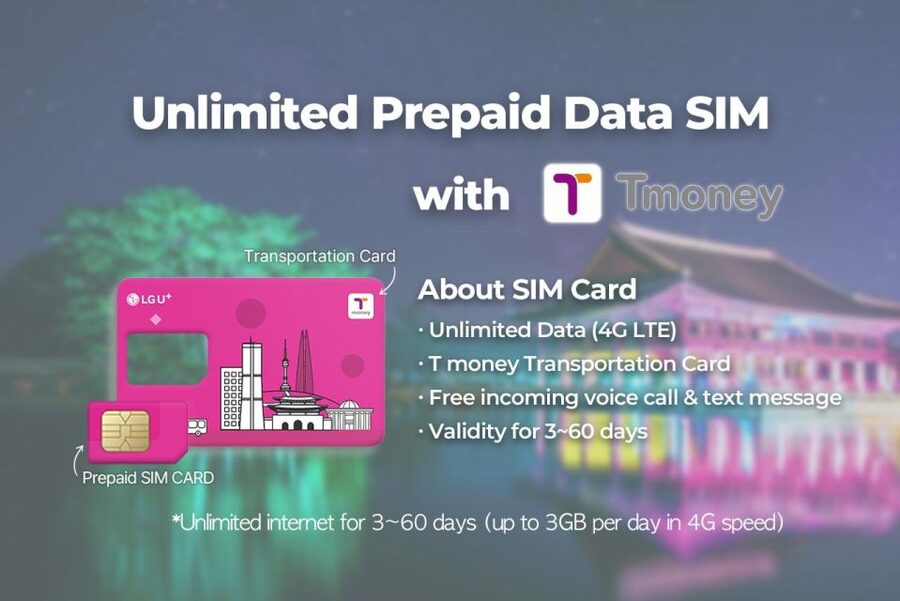
Have your passport and booking information ready at the counter. The stated limit is three purchases per passport, so larger groups should check how many individual cards can be collected under their arrangements.
Take a screenshot of your booking before boarding. You may have no mobile data yet, and relying on airport Wi-Fi or an online confirmation page can slow down a simple pickup.
Keep your phone powered on and charged. The staff can install the SIM, but you still need enough battery to test data and contact your accommodation.
After installation, check three things:
- Mobile data is switched on for the Korean SIM.
- Your phone shows a network connection.
- A map or website loads before you leave the counter.
If your phone uses two SIMs, ask the agent which line is selected for data. If your phone has a physical SIM tray, verify the size required. The package includes nano, micro, and standard formats, but you should still know what your device takes.
Accessibility is another practical plus. The counter service is wheelchair accessible, though airport distances can still be considerable depending on your arrival gate and terminal.
Who should book this airport package?
I would choose this for a first visit to Korea, a late arrival, or anyone who wants the least amount of technical fuss. It is particularly useful if you are not confident changing SIM cards or checking mobile settings yourself.
It also suits families and pairs who want to get connected together. Hotspot use gives you another way to share data, although each person who wants an individual SIM and T-money card needs the appropriate purchase.
You may prefer another option if your phone is eSIM-only, especially a United States iPhone 14. You may also want to compare airport kiosk prices if saving every dollar matters more than booking ahead.
If you already have a working international data plan and a T-money card, this package offers less. Its strongest point is the combination of two arrival tasks in one stop: mobile access and transport payment.
Should you book the Incheon SIM and T-money card?
Book it if you want staff to install a physical SIM, confirm that your data works, and hand you a transport card before you leave the airport. The strongest value comes from the quick setup, reliable 4G access, and the ability to start using public transport soon after arrival.
Before booking, confirm that your phone is unlocked and accepts a physical SIM. Bring cash for the T-money top-up, take a queue ticket at the counter, and choose the Terminal 1 Gate A location if you want the recommended, less busy option.
At $12 per person, it is a practical arrival service rather than a rock-bottom mobile deal. For many visitors, the minutes saved and the help at the counter are worth the modest premium. If you want maximum flexibility and do not mind arranging an eSIM or buying a package after landing, compare alternatives. Otherwise, this is a sensible way to begin a Korea trip with data and a subway card already in hand.
FAQ
Where do I pick up the SIM and T-money card?
At Incheon Airport, use the LG U+ counter at Terminal 1 Gate A or Gate F. At Terminal 2, pickup is available at Gate 3 to 4 or Gate 4 to 5.
Which pickup point is recommended at Terminal 1?
Gate A is recommended because it is generally less busy.
What languages do the counter staff speak?
The host or greeter service is available in English and Korean.
What kind of data does the SIM include?
The package includes unlimited 4G LTE data for the duration you select, from 3 days to 2 months.
Can I use the SIM for phone calls and text messages?
Incoming calls and text messages are included. Outgoing calls and text messages are not included.
Is hotspot use included?
Yes. Hotspot usage is included with the data SIM.
How do I use the T-money card?
You must first charge money onto the card. After that, you can use it for public transportation, including subways and buses, as well as certified taxis and selected convenience-store purchases.
Can I use a United States iPhone 14 with this SIM?
United States iPhone 14 models do not have a physical SIM tray and support only eSIM. This package provides a physical SIM, so those phone models are not suitable for it.
Can I cancel the booking?
Yes. You can cancel up to 24 hours in advance for a full refund. Reserve-now, pay-later booking is also available.
Recently added around Seoul
- Seoul: Private Car Tour with Licensed Professional Guide★ 5.0 · 3 reviews
- Imjingak DMZ Private Tour for Incheon Airport and Cruise Guests★ 5.0 · 3 reviews
- Seoul: Nami and K-Garden with Optional Alpaca Winter Tour★ 5.0 · 3 reviews
- Unique Native Experience : Han River Picnic, Board game, BBQ★ 5.0 · 3 reviews
- BTS In The Soop Version: One Day Private VIP Tour★ 5.0 · 3 reviews
- DMZTour from Seoul:3rd Tunnel,North Korea View&UNESCO Valley★ 5.0 · 3 reviews
- Bukhansan mountain hiking tour – 6 hours★ 4.7 · 3 reviews
- Seoul’s Hidden Dark History Guided Tour of Seodaemun Prison★ 5.0 · 3 reviews
Seoul Tours, compared.

Best DMZ Tour Korea from Seoul (Red Suspension Bridge Optional)
Read the review →
DMZ Tour: 3rd Tunnel, Option(Suspension Bridge, Boat) from Seoul
Read the review →
DMZ tour south Korea from Seoul (NK experience hall, defector)
Read the review →

DMZ The 3rd Tunnel and Suspension Bridge Tour
Read the review →
Signature DMZ Tour: Exclusive Defector Talk & Suspension Bridge
Read the review →
Thrilling Korean DMZ 3rd Tunnel Tour from Seoul + Red Bridge Rush
Read the review →