Reviewed · SEOUL TOURS
South Korea: Unlimited Data and Voice eSIM
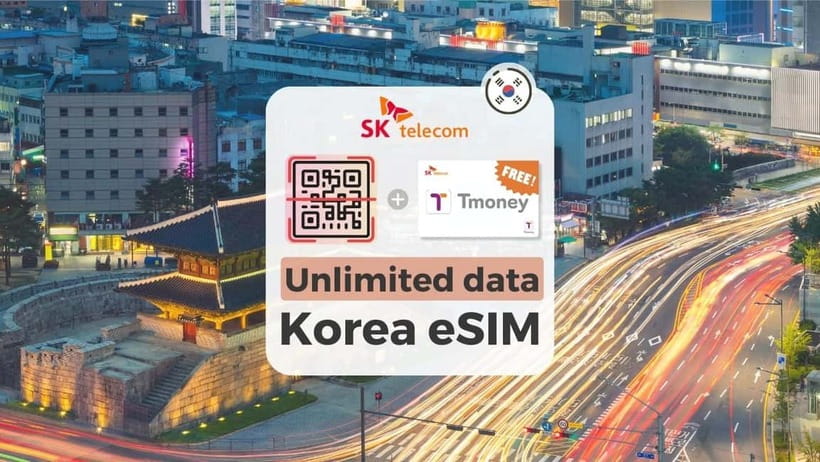
South Korea is a place where you will use your phone constantly, from checking subway routes to translating menus and finding the right exit at a huge station. This unlimited 4G LTE eSIM connects to SK Telecom after you arrive, giving you a practical way to stay online without hunting for Wi-Fi.
I like the simple QR-code setup and the broad choice of validity, from short visits to stays of up to 90 days. I also like that hotspot sharing is supported and that you can obtain a Korean number for calls and texts after passport verification. The catch is important: voice and outgoing SMS are not ready at first, and eSIM installation can be confusing if your phone is not prepared.
Key points to know before buying
- SK Telecom network: The eSIM connects to SKT, one of South Korea’s major mobile providers, after you land.
- Unlimited data: The plan provides unlimited 4G LTE data without stated speed throttling.
- Separate QR email: The GetYourGuide voucher QR code is not the eSIM code. Expect the actual code by email one day before your selected date.
- Korean number after verification: A 010 number and voice and text services become available after online passport validation.
- Hotspot included: You can share the connection with another device.
- Phone checks matter: Your device must support eSIM and be unlocked for use with a foreign carrier.
Why this eSIM matters in South Korea
A data connection in Korea is not just a convenience. It helps you translate signs, check train changes, use maps, contact hotels, and find restaurants when you are tired and carrying luggage. South Korean cities are well connected, but their size and dense streets can make a working map app essential.
At $8 per person, this eSIM can be excellent value if you need data for several days. The price is especially attractive for a short city break, though you should confirm the exact validity option and price shown at booking. A hotel Wi-Fi connection will not help much when you are outside, and buying a physical SIM at the airport can take more time.
You also avoid swapping out your regular SIM card. That means you are less likely to lose your home SIM in a jacket pocket or airport tray. Your phone can keep its usual SIM available, though you must set the Korean eSIM as the data line and check how your phone handles calls.
The plan is data-first. Incoming calls and text messages are included without additional charges, but outgoing calls and SMS are not included. The Korean number and voice functions require online verification, and you need to recharge before making calls after activation.
A few more Seoul half-days to weigh up
- Best DMZ Tour Korea from Seoul (Red Suspension Bridge Optional)
★ 5.0 · 41,422 reviews - DMZ Tour: 3rd Tunnel, Option(Suspension Bridge, Boat) from Seoul
★ 5.0 · 21,373 reviews - DMZ tour south Korea from Seoul (NK experience hall, defector)
★ 5.0 · 20,599 reviews
Installing the QR code before you fly
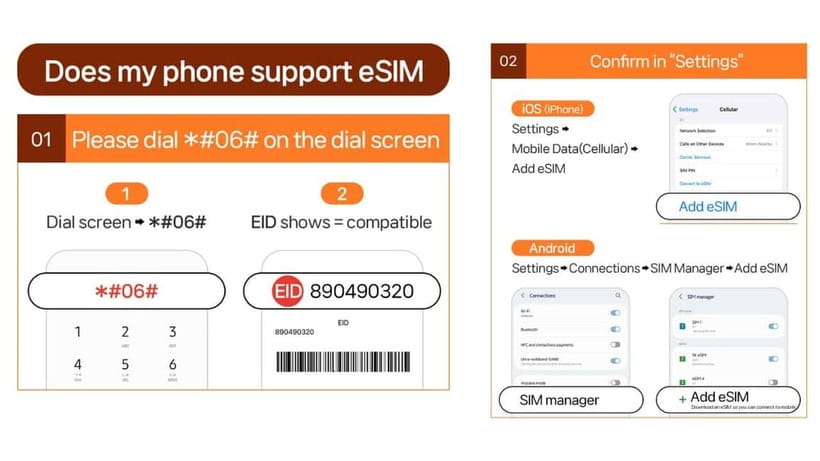
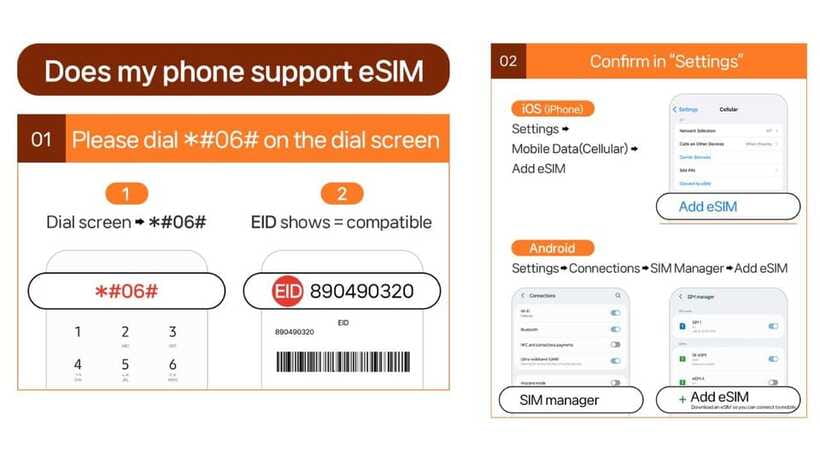
The most important preparation happens before departure. First, confirm that your phone supports eSIM. On many phones, you can dial #06# and look for an EID. If there is no EID, the phone is not compatible with this product.
Your phone also needs to be unlocked. This matters particularly for phones purchased through mobile providers in the United States, Canada, Japan, or the Philippines. A phone can support eSIM technology and still reject a Korean network because it remains carrier locked.
The eSIM QR code arrives separately from the booking voucher, generally one day before the activity date. Save that email somewhere you can open easily. The QR code printed on the main voucher is not the installation code, and scanning the wrong one can create needless confusion.
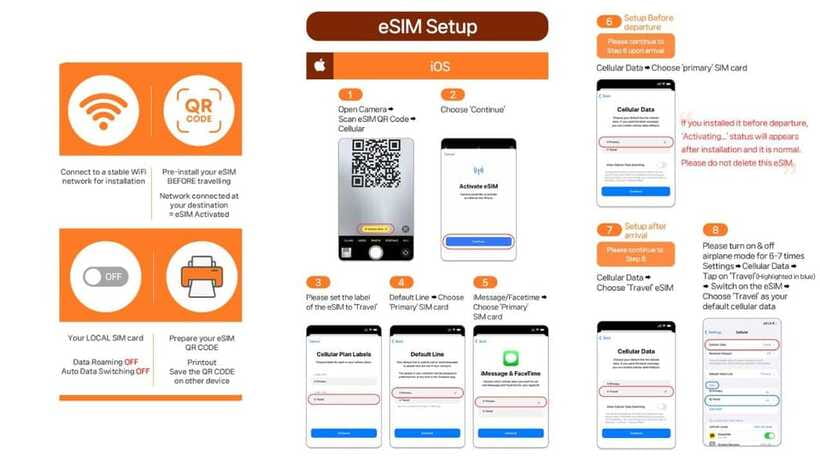
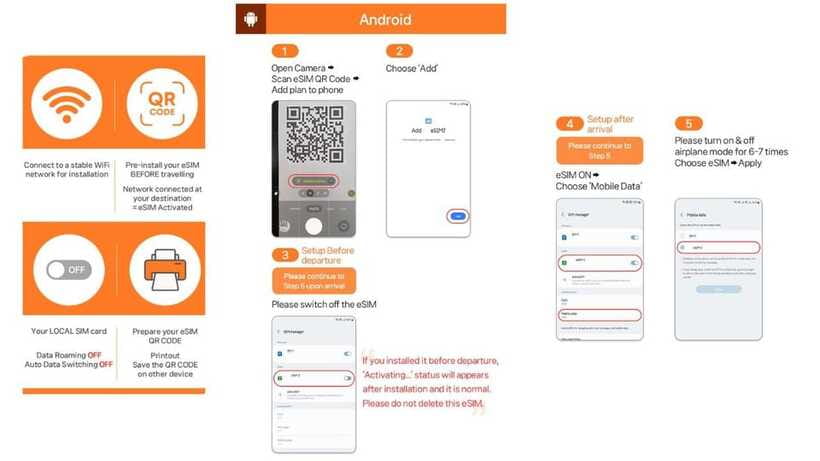
Install the eSIM while you still have reliable internet, but do not expect it to provide Korean service before you arrive. The plan connects to the local network after arrival in Korea. Keep your normal SIM active until you know the eSIM is working, and label the new line clearly so you do not choose the wrong one for mobile data.
Installation is usually a quick phone-settings task, but you should not treat it as completely foolproof. One setup account described spending about an hour working through the installation and then returning for help when the connection failed. That is a warning to allow time and keep the supplier contact details handy.
Landing in Korea and getting connected
The eSIM activates when it connects to SK Telecom’s network in Korea. Its validity runs by the hour, not simply by calendar date. A three-day plan activated on January 1 at 10 p.m. ends on January 4 at 10 p.m.
That hourly system is useful if you land late at night, since you are not automatically losing a full calendar day at midnight. It also means you should think carefully about when you first enable the line. If you install it early but the phone does not connect to SKT until arrival, the service begins when the local connection starts.
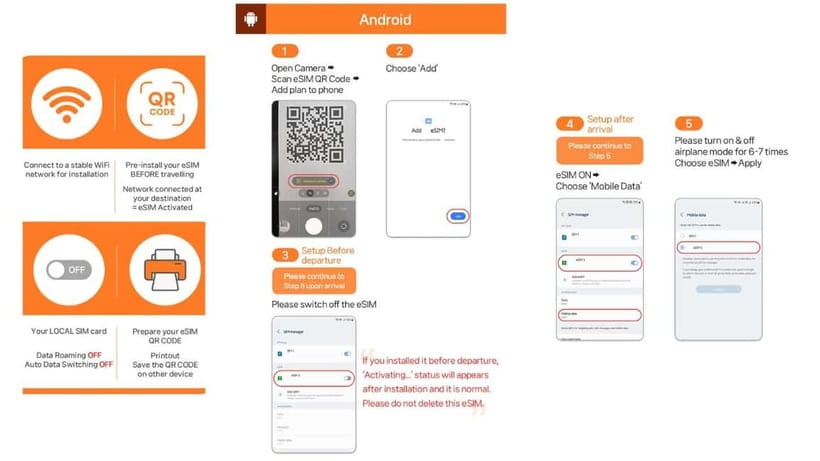
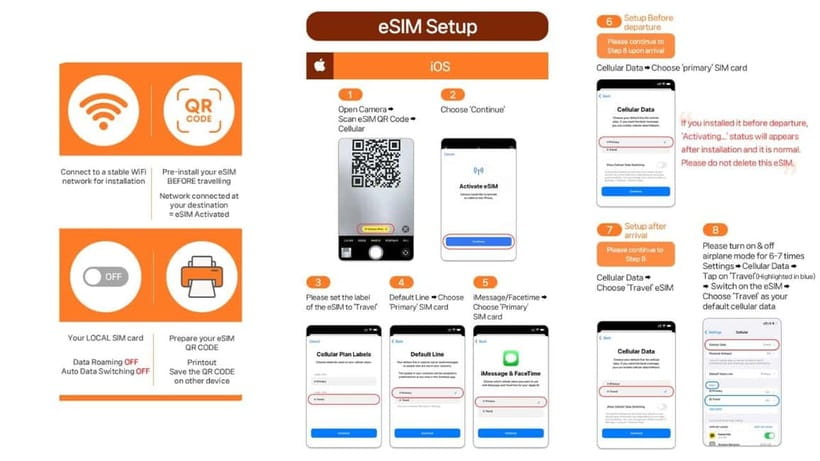
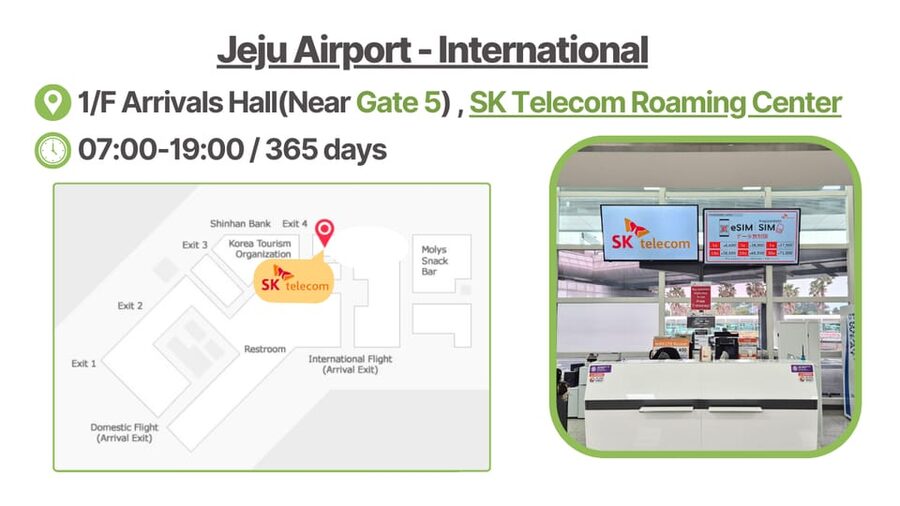
Once you land, turn on the Korean eSIM line and allow data roaming for that line if your phone requires it. Keep data roaming off for your home SIM if you want to avoid accidental international charges. The exact menu names vary, but iPhones generally use Cellular settings, while Android phones often place the controls under Connections and SIM Manager.
If the phone says the QR code is invalid, do not immediately assume the eSIM has failed. Check the Cellular menu on iOS or SIM Manager on Android to see if a new eSIM has already appeared. This is a particularly useful troubleshooting step because a phone may accept the profile even while displaying an unhelpful message.
For technical trouble, contact LINK KOREA at [email protected] or through its WhatsApp contact. Do this early rather than after you have spent an hour changing settings at random.
What unlimited 4G LTE really gives you
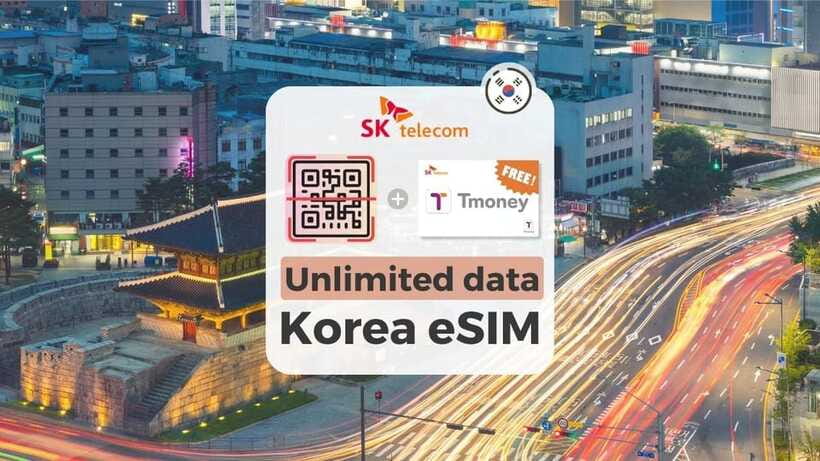
The main product is unlimited data without speed throttling, delivered through SK Telecom’s 4G LTE service. That is enough for the tasks most visitors care about: maps, translation, messaging, web searches, ride planning, and uploading photos.
Unlimited data also removes the mental arithmetic that comes with a small tourist allowance. You can look up a subway route again, send a large batch of photos, or use your phone throughout a long day without checking a shrinking data meter.
The plan supports hotspot sharing, which is handy if you carry a tablet, laptop, or second phone. It can also let a companion connect briefly, although the product is sold per person and you should not assume that one eSIM is intended to serve an entire group.
The listed service is 4G LTE rather than a promise of 5G. For ordinary navigation and communication, that distinction should not matter much. The important benefit is a stable local connection, and the strongest praise for this product centers on easy installation and stable signal once the service is working.
Still, no mobile plan eliminates every problem. Indoor coverage, phone settings, local network conditions, and the device itself can affect your connection. If data drops, check that the Korean line remains selected for mobile data and that your home SIM has not taken control again.
A different way to spend a day from here:
- Seoul: DMZ Tour with Optional Suspension Bridge
★ 4.8 · 5,277 reviews - Seoul: DMZ The 3rd Tunnel and Suspension Bridge Tour
★ 5.0 · 4,656 reviews - Signature DMZ Tour: Exclusive Defector Talk & Suspension Bridge
★ 5.0 · 4,459 reviews - Incheon Airport: Traveler SIM & T-money Transportation Card
★ 4.7 · 3,332 reviews
Adding a Korean 010 number
The call and text feature is more involved than the data feature. Before verification, the eSIM can be used for data only. To obtain the Korean 010 number and use voice and text services, you must complete the SK Telecom passport verification process online.
Verification is available at www.skroaming.com/passport. The stated operating hours are 8 a.m. to 10 p.m. daily, and verification can only be completed one hour after you enter Korea. You will need your passport details, the rental contract number, and the SIM or eSIM phone number.
The process allows only one phone number to be registered to each passport. If you collect several SIM cards, each one must be validated online by its user before call functions can be activated.
The package includes 1,320 Korean won in voice credit, described as roughly five minutes of domestic calls. That is a small starter balance, not unlimited calling. You must recharge online before using the call feature after verification, through the SK Telecom roaming charging page.
This makes the Korean number useful for receiving calls, texts, or handling a situation where a local number is required. It is less suitable if you expect to make frequent restaurant bookings or long domestic calls without adding credit. For many people, messaging apps and data will do most of the work.
Choosing the right validity period
The available plans cover short and long stays, with options listed from 2 to 90 days. Some promotional material describes the range as 3 to 90 days, so check the exact choice shown when you reserve.
For a quick Seoul stop, a short plan may be enough. For a two-week holiday or a multi-city trip, the longer options save you from reinstalling a new SIM halfway through your visit. The hourly activation rule gives you some flexibility around late-night arrivals.
This is designed as a short-term tourist product. Foreign visitors staying 91 days or longer may be limited to data-only service, and the passport verification may not work for long-term residents. The product does not offer a refund for those service limits, so it is a poor fit for anyone planning a stay beyond the stated tourist period.
Korean passport holders cannot buy this eSIM. You must be a foreign visitor with an overseas passport.
The real setup experience
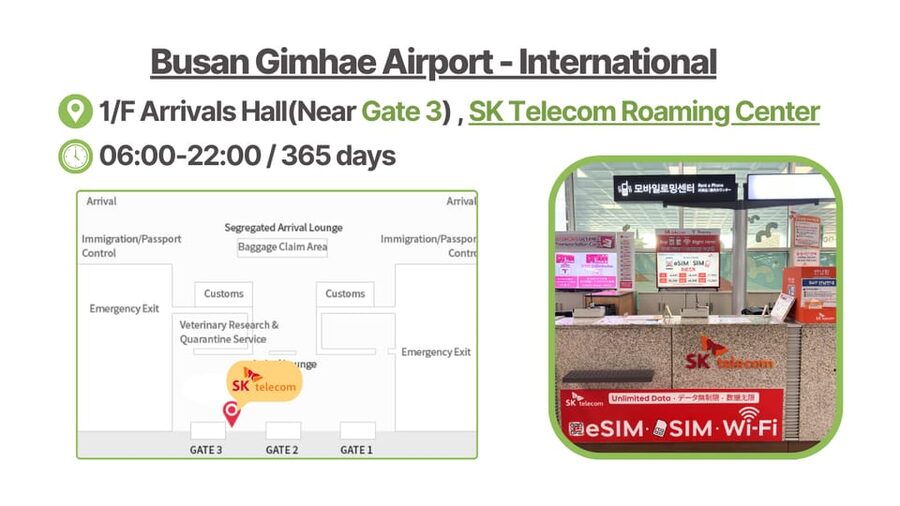
The best part of this product is its low physical fuss. There is no airport counter requirement, no SIM tray to open, and no small plastic card to store. Once your phone accepts the QR code and connects to SKT, you have an active local data line.
The weak point is customer assistance during installation. One person found the instructions difficult and received a printed explanation rather than step-by-step setup at the counter. After a later adjustment, the data disconnected again, which made the first hour stressful.
That does not mean every installation will go badly. Other users found it very simple, quick, and stable. The contrast tells you what kind of buyer this suits: someone comfortable opening phone settings, switching SIM lines, and following troubleshooting instructions.
If you are not comfortable with eSIMs, ask a family member or friend to help before you leave. Take screenshots of your home SIM settings before making changes. Keep the QR email, passport, contract details, and supplier contact information together.
Do not delete the eSIM while troubleshooting unless the supplier tells you to. An eSIM generally cannot be treated like a physical card that you can casually remove and reinstall, and the purchase is not refundable once it has been issued.
Who should buy this South Korea eSIM
I would choose this for a visitor who wants a strong data connection at a low price and already uses an unlocked eSIM-capable phone. It is particularly useful for independent sightseeing, multi-day city trips, and anyone who relies on online maps and translation.
It also works well for couples or families who want each person to have a separate line and the option to share data by hotspot. The broad validity range is helpful when one person is visiting for a weekend and another is staying longer.
I would be more cautious if you need guaranteed hands-on installation. The information provided does not promise a dedicated setup appointment, and the difficult installation experience shows that support may not always solve the problem immediately.
I would also skip it if your phone is carrier locked, lacks an EID, or you hold a Korean passport. Those are not minor technical details. They can decide whether the product works at all.
Price, cancellation, and practical value
At $8 per person, the price is easy to justify for unlimited local data, particularly if you would otherwise pay international roaming charges. The value improves when you use the connection all day for maps, messages, searches, and hotspot sharing.
The Korean number adds potential value, but only after verification and recharge. Do not buy this expecting free outgoing calls. Incoming calls and texts have no additional charge, while outgoing services require the included credit and later top-ups.
You can cancel up to 24 hours before the selected date for a full refund. Once the eSIM has been issued, however, it cannot be refunded. That is another reason to confirm device compatibility before purchase rather than treating the booking as a trial.
Reserve and pay later is available, which helps if your plans are still changing. Keep your passport available, since it is required for eligibility and for voice and SMS verification.
Should you book it?
Book this eSIM if your priority is cheap, unlimited Korean data on a compatible, unlocked phone. The SK Telecom connection, hotspot support, hourly validity, and short to long plan choices make it a sensible tool for most independent visitors.
Do not book it for unlimited calling, because that is not what you receive. Choose it only after checking for an EID, confirming that your phone is unlocked, and accepting that you may need to install and troubleshoot the eSIM yourself.
If those conditions suit you, this is a strong-value data plan. Prepare the phone before flying, wait for the separate QR email, and complete passport verification only if you truly need the Korean number.
FAQ
Does this eSIM provide unlimited data in South Korea?
Yes. It provides unlimited 4G LTE data without stated speed throttling on the SK Telecom network.
Which network does the eSIM use?
The eSIM connects to SK Telecom, also known as SKT, after you arrive in South Korea.
When will I receive the eSIM QR code?
The actual eSIM QR code is sent separately by email one day before the activity date. The QR code on the main booking voucher is not the eSIM installation code.
Does the eSIM work before I arrive in Korea?
No. It connects to the local network after you arrive in South Korea.
How can I check if my phone supports eSIM?
Dial #06# on your phone and look for an EID. If no EID appears, the phone is not compatible with this eSIM.
Does my phone need to be unlocked?
Yes. Your phone must be fully unlocked for use with a foreign mobile provider. This is especially important for phones purchased in the United States, Canada, Japan, or the Philippines.
Are voice calls and SMS included?
Data is available first. Voice calls and SMS require online passport verification, and outgoing calls and texts require recharge. Incoming calls and text messages are included without additional charges.
How do I activate the Korean phone number?
Visit www.skroaming.com/passport for passport verification. Verification is available from 8 a.m. to 10 p.m. daily and can be completed one hour after entering Korea.
How long does the eSIM remain valid?
Plans are available for short stays through 90 days. The eSIM activates when it connects to SK Telecom and expires based on hours. A three-day plan activated at 10 p.m. ends three days later at 10 p.m.
Can I share the eSIM connection with another device?
Yes. Hotspot sharing is supported.
Recently added around Seoul
- Seoul: Private Car Tour with Licensed Professional Guide★ 5.0 · 3 reviews
- Imjingak DMZ Private Tour for Incheon Airport and Cruise Guests★ 5.0 · 3 reviews
- Unique Native Experience : Han River Picnic, Board game, BBQ★ 5.0 · 3 reviews
- Seoul: Nami and K-Garden with Optional Alpaca Winter Tour★ 5.0 · 3 reviews
- BTS In The Soop Version: One Day Private VIP Tour★ 5.0 · 3 reviews
- DMZTour from Seoul:3rd Tunnel,North Korea View&UNESCO Valley★ 5.0 · 3 reviews
- Bukhansan mountain hiking tour – 6 hours★ 4.7 · 3 reviews
- Seoul’s Hidden Dark History Guided Tour of Seodaemun Prison★ 5.0 · 3 reviews
Seoul Tours, compared.
Best DMZ Tour Korea from Seoul (Red Suspension Bridge Optional)
Read the review →
DMZ Tour: 3rd Tunnel, Option(Suspension Bridge, Boat) from Seoul
Read the review →
DMZ tour south Korea from Seoul (NK experience hall, defector)
Read the review →

DMZ The 3rd Tunnel and Suspension Bridge Tour
Read the review →
Signature DMZ Tour: Exclusive Defector Talk & Suspension Bridge
Read the review →
Thrilling Korean DMZ 3rd Tunnel Tour from Seoul + Red Bridge Rush
Read the review →